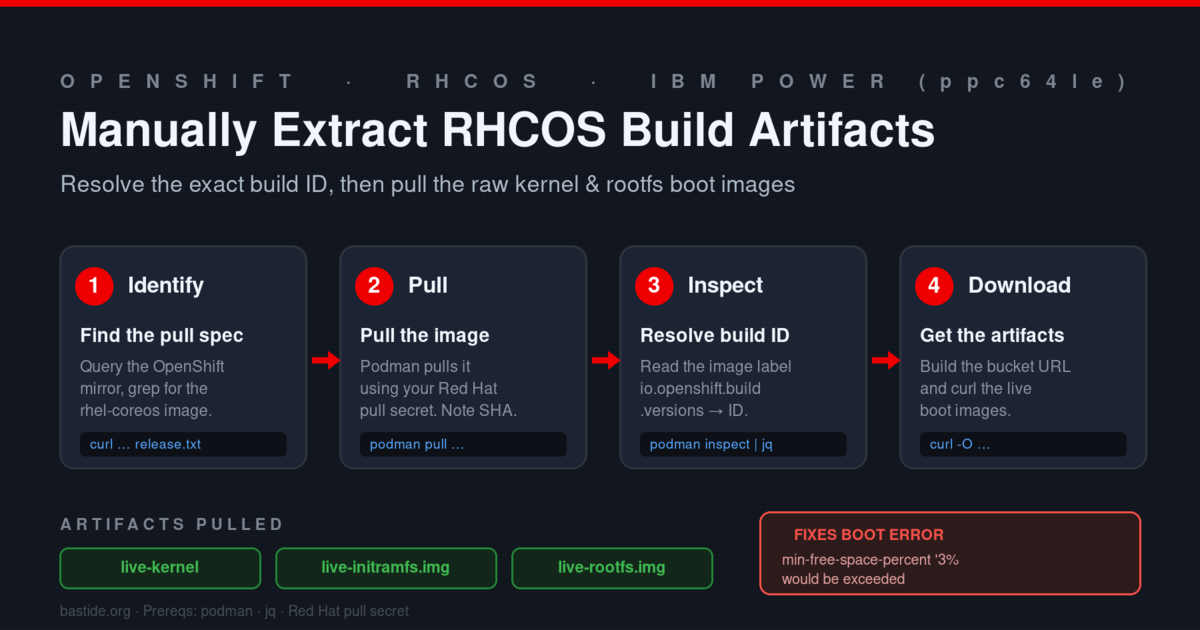
Category: OpenShift

  • OpenShift 4.21.0: Using rhel-coreos-10 nodes

    With OpenShift 4.21.0, you will see two new entries in the release payload for rhel-coreos-10 and rhel-coreos-10-extensions. These are node images for RHEL 10. This capability is a DevPreview/Tech Preview, and will be available as a stable/generally available feature in a future release.

    An example of the release payload entry:

    rhel-coreos-10                                 quay.io/openshift-release-dev/ocp-v4.0-art-dev@sha256:ca2fc3c3f56da0772fe6d428b78c4ce4ed36afaf9cc5a71f6c310ffb1673772a
    rhel-coreos-10-extensions                      quay.io/openshift-release-dev/ocp-v4.0-art-dev@sha256:077b897ed0cd007ed9b88762d6834fcfc0b9508538ddc9df1dbc0917231e45fc
    

    Note, there is a limitation that you use RHEL10 nodes with Power 10 or Power 11 based systems.

    You can create a new MachineConfigPool with the name rhel10 using Multi-Architecture Compute: Supporting Architecture Specific Operating System and Kernel Parameters. The matchExpression applies the worker and rhel10 MachineConfig objects to the MachineConfigPool members. The members are determined based on the matchLabels.

    cat <<EOF | oc apply -f -
    apiVersion: machineconfiguration.openshift.io/v1
    kind: MachineConfigPool
    metadata:
      name: rhel10
    spec:
      machineConfigSelector:
        matchExpressions:
          - {key: machineconfiguration.openshift.io/role, operator: In, values: [worker,rhel10]}
      nodeSelector:
        matchLabels:
          node-role.kubernetes.io/rhel10: ""
    EOF
    

    Verify the power MachineConfigPool is created.

    Find the rhel-coreos image

    oc adm release info --image-for rhel-coreos
    

    Now that the rhel10 MachineConfigPool is created.

    cat <<EOF | oc apply -f -
    apiVersion: machineconfiguration.openshift.io/v1
    kind: MachineConfig
    metadata:
      labels:
        machineconfiguration.openshift.io/role: rhel10
      name: 99-override-image-rhel10
    spec:
      osImageURL: "quay.io/openshift-release-dev/ocp-v4.0-art-dev@sha256:ca2fc3c3f56da0772fe6d428b78c4ce4ed36afaf9cc5a71f6c310ffb1673772a"
    EOF
    

    You have seen how to use RHEL10 nodes with OpenShift on IBM Power.

  • OpenShift 4.21.0 ClusterImagePolicy Feature enforces signature verification

    With OpenShift Container Platform 4.21, Red Hat further improved supply chain security with signature verification for the release image. The verification is controlled by the ClusterImagePolicy which specifies the Root CA and a scope of quay.io/openshift-release-dev/ocp-release. When an image is used on a node, the signatures are pulled from the mirror along with the image, and verified before starting a container.

    If you are running a disconnected cluster and the signature is missing from your mirror, you’ll see the following:

    • Install: The bootstrap node hangs and does not install as the signature is not verified.
    • Upgrade: The ClusterImagePolicy enforces signature verification. If the signatures are missing from your mirror, the Cluster Version Operator (CVO) will be blocked, preventing node updates.

    In order to continue, you may do one of the following:

    1. Use oc mirror --v2 to mirror your content. This feature automatically honors signatures … see Mirroring images for a disconnected installation using the oc-mirror plugin
    2. If you are currently using oc adm release mirror, you can copy the sig file for the release payload:
    $ oc image mirror quay.io/openshift-release-dev/ocp-release:${RELEASE_DIGEST}.sig registry.example.com/openshift/whatever:${RELEASE_DIGEST}.sig
    

    RELEASE_DIGEST:: Specifies your digest image with the : character replaced by a - character. For example: sha256:884e1ff5effeaa04467fab9725900e7f0ed1daa89a7734644f14783014cebdee becomes sha256-884e1ff5effeaa04467fab9725900e7f0ed1daa89a7734644f14783014cebdee.sig.

    It is recommended you switch to using oc mirror --v2

    Good luck with your disconnected clusters, and ensure image signatures are present in your local mirror using one of the mirroring methods.

    References

    1. Red Hat OpenShift Docs: Chapter 12. Manage secure signatures with sigstore
    2. Red Hat Developer: How to verify container signatures in disconnected OpenShift
    3. Red Hat Developer: Verify Cosign bring-your-own PKI signature on OpenShift
    4. Red Hat Developer: How oc-mirror version 2 enables disconnected installations in OpenShift 4.16
  • cert-manager for Red Hat OpenShift: using self-signed certs in your cluster

    In Red Hat OpenShift, cert-manager is a specialized operator that automates the management of X.509 (SSL/TLS) certificates. It acts as a “Certificates-as-a-Service” tool within your cluster, ensuring that applications have valid, up-to-date certificates without requiring manual intervention from administrators.

    This blog shows how to use self-signed certs in your cluster.

    Here is a Recipe to use trusted ceritifcates in your cluster:

    Install the Red Hat cert-manager Operator on OpenShift 4.20 using only the CLI and the official Red Hat catalog, follow these steps.

    This process involves creating a namespace, an OperatorGroup, and a Subscription to the Red Hat operator catalog.

    1. Create the Namespace

    First, create a dedicated namespace for the cert-manager operator. Red Hat recommends using cert-manager-operator.

    oc create namespace openshift-cert-manager-operator
    
    1. Create the OperatorGroup

    An OperatorGroup defines the multi-tenant configuration for the operator. In most cases for cert-manager, we configure it to watch all namespaces (cluster-wide).

    cat <<EOF | oc apply -f -
    apiVersion: operators.coreos.com/v1
    kind: OperatorGroup
    metadata:
      name: openshift-cert-manager-operator
      namespace: openshift-cert-manager-operator
    spec:
      upgradeStrategy: Default
    EOF
    
    1. Create the Subscription

    The Subscription tells the Operator Lifecycle Manager (OLM) which operator to install, which catalog to use, and which channel to track. For OpenShift 4.20, we use the stable-v1 channel from the redhat-operators catalog.

    cat <<EOF | oc apply -f -
    apiVersion: operators.coreos.com/v1alpha1
    kind: Subscription
    metadata:
      name: openshift-cert-manager-operator
      namespace: openshift-cert-manager-operator
    spec:
      channel: stable-v1
      installPlanApproval: Automatic
      name: openshift-cert-manager-operator
      source: redhat-operators
      sourceNamespace: openshift-marketplace
    EOF
    
    1. Verify the Installation

    It takes a few moments for OLM to process the subscription and deploy the pods. Run these commands to track the progress:

    • Check the Cluster Service Version (CSV) Status
    [root@rct-ocp-pra-fbac-bastion-0 ~]# oc get csv -n openshift-cert-manager-operator -w
    NAME                            DISPLAY                                       VERSION   REPLACES                        PHASE
    cert-manager-operator.v1.18.0   cert-manager Operator for Red Hat OpenShift   1.18.0    cert-manager-operator.v1.17.0   Installing
    cert-manager-operator.v1.18.0   cert-manager Operator for Red Hat OpenShift   1.18.0    cert-manager-operator.v1.17.0   Succeeded
    

    Wait until the Phase changes to Succeeded.

    • Check the Operator Pods
    oc get pods -n openshift-cert-manager-operator
    
    • Check the cert-manager Component Pods: Once the operator is running, it will automatically deploy the actual cert-manager components (controller, webhook, and CA injector) into a new namespace called cert-manager.
    [root@rct-ocp-pra-fbac-bastion-0 ~]# oc get pods -n cert-manager
    NAME                                      READY   STATUS    RESTARTS   AGE
    cert-manager-cainjector-758dbfb96-2qsc4   1/1     Running   0          57s
    cert-manager-cc4c8748-6xztc               1/1     Running   0          48s
    cert-manager-webhook-7949d5896-dqrfn      1/1     Running   0          57s
    

    To set up a self-signed issuer, you need to define a ClusterIssuer (available across the whole cluster) or an Issuer (restricted to a single namespace).

    In the context of cert-manager, a Self-Signed issuer is the simplest type; it doesn’t require an external CA or DNS validation. It is often used to bootstrap a Root CA for internal services.

    1. Create a Cluster-Wide Self-Signed Issuer

    Use this if you want any namespace in your OpenShift cluster to be able to request self-signed certificates.

    cat <<EOF | oc apply -f -
    apiVersion: cert-manager.io/v1
    kind: ClusterIssuer
    metadata:
      name: selfsigned-cluster-issuer
    spec:
      selfSigned: {}
    EOF
    
    1. Verify the Issuer Status

    Once applied, check that the issuer is “Ready.”

    [root@rct-ocp-pra-fbac-bastion-0 ~]# oc get clusterissuer selfsigned-cluster-issuer
    NAME                        READY   AGE
    selfsigned-cluster-issuer   True    38s
    
    1. Create a Root CA Certificate

    This certificate will be signed by the ClusterIssuer and act as your internal CA.

    oc apply -f - <<EOF
    apiVersion: cert-manager.io/v1
    kind: Certificate
    metadata:
      name: internal-root-ca
      namespace: cert-manager
    spec:
      isCA: true
      commonName: internal-root-ca
      secretName: internal-root-ca-secret
      issuerRef:
        name: selfsigned-cluster-issuer
        kind: ClusterIssuer
    EOF
    
    1. Create the CA ClusterIssuer Now, create an issuer that uses that secret to sign other certificates (like your Webhook’s).
    oc apply -f - <<EOF
    apiVersion: cert-manager.io/v1
    kind: ClusterIssuer
    metadata:
      name: console-ca-issuer
      namespace: cert-manager
    spec:
      ca:
        secretName: internal-root-ca-secret
    EOF
    
    1. Create the service Certificate The dnsNames must match the Service name of your webhook.
    oc apply -f - <<EOF
    apiVersion: cert-manager.io/v1
    kind: Certificate
    metadata:
      name: console-demo-plugin-cert
      namespace: console-demo-plugin
    spec:
      dnsNames:
        - console-demo-plugin.console-demo-plugin.svc
        - console-demo-plugin.console-demo-plugin.svc.cluster.local
      secretName: console-serving-cert
      issuerRef:
        name: console-ca-issuer
        kind: ClusterIssuer
    EOF
    
    1. Extract the CA bundle from the secret to a local file
    oc get secret internal-root-ca-secret -n cert-manager \
      -o jsonpath='{.data.ca\.crt}' | base64 -d > internal-ca-bundle.crt
    
    1. Add to Cluster Trust store
    oc create configmap custom-ca \
      --from-file=ca-bundle.crt=internal-ca-bundle.crt \
      -n openshift-config
    
    1. Adding certificate authorities to the clust link
    oc patch proxy/cluster --type=merge \
      --patch='{"spec":{"trustedCA":{"name":"custom-ca"}}}'
    
    1. Delete the console pods and wait until it is restarted
    [root@rct-ocp-pra-fbac-bastion-0 ~]# oc delete pods -n openshift-console --all
    ...
    [root@rct-ocp-pra-fbac-bastion-0 ~]# oc get pods -n openshift-console
    NAME                         READY   STATUS    RESTARTS   AGE
    console-7554bb587c-hkqd4     1/1     Running   0          5m24s
    console-7554bb587c-jlxtd     1/1     Running   0          5m24s
    downloads-678b99d49c-8n64s   1/1     Running   0          5m24s
    downloads-678b99d49c-fgmgp   1/1     Running   0          5m24s
    

    You can now use the Certificates in your cluster to secure communication in your cluster.

  • Beyond the Static Dashboard: The Power of the Dynamic ConsolePlugin in OpenShift

    In the fast-evolving world of cloud-native platforms, a “one size fits all” user interface is no longer enough. As your ecosystem grows, your console needs to grow with it—without requiring a full platform reboot every time you want to add a new feature.

    Enter Dynamic Plugins. By shifting away from hardcoded UI components toward a flexible, runtime-loaded architecture, developers can now inject custom pages and extensions directly into the console on the fly. Leveraging the power of the Operator Lifecycle Manager (OLM), these plugins are delivered as self-contained micro-services that integrate seamlessly into your existing workflow. In this post, we’ll explore how this architecture turns your cluster console into a living, extensible platform.

    Here is the recipe to test the ConsolePlugin

    With the test setup and conversation, you’ll need to recompile the container image

    1. Setup the external route for the Image Registry
    $ oc patch configs.imageregistry.operator.openshift.io/cluster --patch '{"spec":{"defaultRoute":true}}' --type=merge
    config.imageregistry.operator.openshift.io/cluster patched
    
    1. Check the OpenShift Image registry host and you see the hostname printed.
    $ oc get route default-route -n openshift-image-registry --template='{{.spec.host }}'
    default-route-openshift-image-registry.apps.rct-ocp-pra-fbac.ibm.com
    
    1. Make the local registry lookup use relative names
    $ oc set image-lookup  --all
    
    1. Set a temporary login
    export KUBECONFIG=~/local_config
    oc login -u kubeadmin -p $(cat openstack-upi/auth/kubeadmin-password) api.rct-ocp-pra-fbac.ibm.com:6443
    
    1. Login to the Registry (you must use )
    $ podman login --tls-verify=false -u kubeadmin -p $(oc whoami -t) default-route-openshift-image-registry.apps.rct-ocp-pra-fbac.ibm.com
    Login Succeeded
    
    1. Revert back to the default kubeconfig
    $ unset KUBECONFIG
    
    1. Create the test plugin
    oc new-project console-demo-plugin
    oc label namespace/console-demo-plugin security.openshift.io/scc.podSecurityLabelSync=false --overwrite=true
    oc label namespace/console-demo-pluginr pod-security.kubernetes.io/enforce=privileged --overwrite=true
    oc label namespace/console-demo-plugin pod-security.kubernetes.io/enforce-version=v1.24 --overwrite=true
    oc label namespace/console-demo-plugin pod-security.kubernetes.io/audit=privileged --overwrite=true
    oc label namespace/console-demo-plugin pod-security.kubernetes.io/warn=privileged --overwrite=true
    
    1. Clone the test repo
    git clone https://github.com/openshift/console-plugin-template
    cd console-plugin-template/
    
    1. Build Container Image
    $ oc project console-demo-plugin
    $ podman build -t $(oc get route default-route -n openshift-image-registry --template='{{.spec.host }}')/$(oc project --short=true)/console-demo-plugin:plugin -f Dockerfile .
    

    :warning: if the build stalls, add the ip of the primary interface to /etc/resolv.conf as a nameserver. For instance nameserver 10.20.184.190 is added as a newline.

    1. Push Container Image
    $ podman push --tls-verify=false $(oc get route default-route -n openshift-image-registry --template='{{.spec.host }}')/$(oc project --short=true)/console-demo-plugin:plugin
    
    1. Helm install the console-plugin-template
    $ helm upgrade -i console-plugin-template charts/openshift-console-plugin \
        -n console-demo-plugin \
        --set plugin.image=$(oc get route default-route -n openshift-image-registry --template='{{.spec.host }}')/$(oc project --short=true)/console-demo-plugin:plugin \
        --set plugin.jobs.patchConsoles.image=quay.io/openshift-release-dev/ocp-v4.0-art-dev@sha256:16816f988db21482c309e77207364b7c282a0fef96e6d7da129928aa477dcfa7
    

    In Conclusion: Seamless Extensibility Through Automation

    Dynamic plugins represent a major leap forward in UI flexibility. By utilizing OLM Operators to manage the underlying infrastructure, the process of extending a console is both automated and scalable. To recap the workflow:

    • Deployment: An Operator spins up a dedicated HTTP server and Kubernetes service to host the plugin’s assets.
    • Registration: The ConsolePlugin custom resource acts as the bridge, announcing the plugin’s presence to the system.
    • Activation: The cluster administrator retains ultimate control, enabling the plugin through the Console Operator configuration.

    This decoupled approach ensures that your console remains lightweight and stable while providing the “pluggable” freedom necessary for modern, customized cloud environments.

    Reference

    Dynamic Plugins in 4.20

  • Deploy OpenShift on IBM PowerVS with Ease

    Deploying Red Hat OpenShift on IBM Power Systems Virtual Server (PowerVS) just got faster. The openshift-install-power project provides a streamlined bash script that automates the deployment process using Infrastructure as Code (IaC).

    By wrapping the Terraform logic of the ocp4-upi-powervs pattern into an interactive script, this tool removes the manual friction of setting up enterprise clusters.

    Release v1.14.0, which further refines the Terraform lifecycle management and improves the automation flow for a more seamless user experience.

    To get started:

    1. Prep: Ensure your PowerVS instance is prepped for deployment.
    2. Clone: git clone https://github.com/ocp-power-automation/openshift-install-power.git
    3. Run: Execute the installer script and follow the prompts.

    For a full demo and documentation, visit the GitHub Repository.

  • IBM Power adds Limited Live Migration Support to OpenShift 4.16

    IBM Power Systems adds official support for Limited Live Migration from OpenShiftSDN to OVN-Kubernetes. Administrators are able to migrate off OpenShiftSDN cluster networks to OVN-Kubernetes without experiencing service interruption. As the preferred migration path, it ensures that enterprise workloads running on OpenShift COntainer Platform on IBM Power maintain continuous availability. For environments where a live transition is not feasible, IBM Power also supports the offline migration method to ensure a successful network evolution.

    Steps

    1. Verifying Setup a. Ensure you are the latest eus-4.16 which is 4.16.54. We used this when testing. OpenShift Upgrade Path b. Ensure the oc get co returns all Operators Ready and none are degrated. c. Review Diagnostic Steps in the Knowledge Base Article: Limited Live Migration from OpenShift SDN to OVN-Kubernetes https://access.redhat.com/solutions/7057169
    2. If everything is OK, you can initiate the limited live migration per 19.5.1.5.4. Initiating the limited live migration process
    oc patch Network.config.openshift.io cluster --type='merge' --patch '{"metadata":{"annotations":{"network.openshift.io/network-type-migration":""}},"spec":{"networkType":"OVNKubernetes"}}'
    
    1. Watch the network.config to see it is complete.
    oc patch Network.config.openshift.io cluster --type='merge' --patch '{"metadata":{"annotations":{"network.openshift.io/network-type-migration":""}},"spec":{"networkType":"OVNKubernetes"}}'
    
    1. After a successful migration operation, remove the network.openshift.io/network-type-migration- annotation from the network.config custom resource by entering the following command:
    oc annotate network.config cluster network.openshift.io/network-type-migration-
    
    1. Afterwards, you may see the following output in network.config, this is OK, and expected.
      # oc get network.config -oyaml
      apiVersion: config.openshift.io/v1
      kind: Network
      metadata:
        creationTimestamp: "2025-12-09T07:03:09Z"
        generation: 18
        name: cluster
        resourceVersion: "545748"
        uid: b3ec83d9-f1ba-4a44-959a-0c60f3e19866
      spec:
        clusterNetwork:
        - cidr: 10.128.0.0/14
          hostPrefix: 23
        externalIP:
          policy: {}
        networkType: OVNKubernetes
        serviceNetwork:
        - 172.30.0.0/16
      status:
        clusterNetwork:
        - cidr: 10.128.0.0/14
          hostPrefix: 23
        clusterNetworkMTU: 1350
        conditions:
        - lastTransitionTime: "2025-12-10T07:25:55Z"
          message: ""
          reason: AsExpected
          status: "True"
          type: NetworkDiagnosticsAvailable
        - lastTransitionTime: "2025-12-10T07:41:38Z"
          message: Network type migration is not in progress
          reason: NetworkTypeMigrationNotInProgress
          status: Unknown
          type: NetworkTypeMigrationMTUReady
        - lastTransitionTime: "2025-12-10T07:41:38Z"
          message: Network type migration is not in progress
          reason: NetworkTypeMigrationNotInProgress
          status: Unknown
          type: NetworkTypeMigrationTargetCNIAvailable
        - lastTransitionTime: "2025-12-10T07:41:38Z"
          message: Network type migration is not in progress
          reason: NetworkTypeMigrationNotInProgress
          status: Unknown
          type: NetworkTypeMigrationTargetCNIInUse
        - lastTransitionTime: "2025-12-10T07:41:38Z"
          message: Network type migration is not in progress
          reason: NetworkTypeMigrationNotInProgress
          status: Unknown
          type: NetworkTypeMigrationOriginalCNIPurged
        - lastTransitionTime: "2025-12-10T07:41:38Z"
          message: Network type migration is completed
          reason: NetworkTypeMigrationCompleted
          status: "False"
          type: NetworkTypeMigrationInProgress
        networkType: OVNKubernetes
        serviceNetwork:
        - 172.30.0.0/16
    

    Best wishes with your migration.

    Reference

    1. 19.5.1.1. Supported platforms when using the limited live migration method https://docs.redhat.com/en/documentation/openshift_container_platform/4.16/html/networking/ovn-kubernetes-network-plugin#supported-platforms-live-migrating-ovn-kubernetes
  • New Containers for IBM Power

    New container images for IBM Power are made available, here are the last four images:

    Image NameTag NameProject LicensesImage Pull CommandLast Published On
    rocketmq5.3.3Apache-2.0docker pull icr.io/ppc64le-oss/rocketmq-ppc64le:5.3.3December 9, 2025
    elasticsearch7.17.28Server Side Public License V1 and Elastic License 2.0docker pull icr.io/ppc64le-oss/elasticsearch-ppc64le:7.17.28Nov 14th, 2025
    zookeeperv3.9.3-debian-12-r19-bvApache License 2.0docker pull icr.io/ppc64le-oss/zookeeper-ppc64le:v3.9.3-debian-12-r19-bvNov 14, 2025
    vllm0.10.1Apache-2.0docker pull icr.io/ppc64le-oss/vllm-ppc64le:0.10.1.dev852.gee01645db.d20250827September 11, 2025

    Reference

    https://community.ibm.com/community/user/blogs/priya-seth/2023/04/05/open-source-containers-for-power-in-icr

  • 🚀 Red Hat Compliance Operator 1.8 GA: Custom Rules Made Easy!

    We are thrilled to announce the GA release of Red Hat Compliance Operator version 1.8, a key tool for auditing and enforcing security compliance on Red Hat OpenShift.

    The focus of this release is significantly lowering the barrier to creating custom compliance definitions:

    • ‼️ [Tech Prev] CustomRule CRDs with Common Expression Language (CEL): Customers can now define custom compliance checks using CEL. This eliminates the need to learn complex SCAP data streams or OVAL, enabling faster development of tailored compliance rules. (A detailed blog post is coming in early December.)
    • Simplified Configuration: The Compliance Operator team has decoupled PV storage from scan result processing, greatly simplifying the operator configuration, especially for customers focused on detecting cluster changes.

    Enhanced Security Profiles:

    • Updated: DISA-STIG profile to V2R3 🏛️.
    • Removed Deprecated Profiles: CIS OpenShift 1.4.0/1.5.0 and DISA STIG V1R1/V2R1 have been removed.

    See the release notes on the Red Hat Customer Portal for full details.

  • 🚀Announcing the Availability of Red Hat OpenShift AI 3.0 on IBM Power

    IBM announced the availability of Red Hat OpenShift AI 3.0 on IBM® Power®:

    This milestone represents over a year of collaboration and engineering dedication to bring the latest capabilities in open and production-ready AI development to IBM Power clients. Built on Kubernetes, Red Hat OpenShift AI provides a flexible and scalable MLOps platform for building, training, deploying, and monitoring machine learning and generative AI models. With version 3.0 now available on IBM Power, clients can unify their AI workloads from experimentation to production on a single enterprise-grade platform.

    Learn more at IBM Blog | IBM Power Modernization

    Credit to Author : Brandon Pederson

  • 🚀 Build Event-Driven Serverless Apps with OpenShift & Kafka!

    Discover how Red Hat OpenShift Serverless, powered by Knative, integrates seamlessly with Apache Kafka to enable scalable, event-driven architectures.

    In the latest Power Developer Exchange blog, walk through:
    ✅ What Knative brings to serverless workloads
    ✅ How to deploy a sample serverless app on OpenShift Container Platform 4.18.9
    ✅ Configuring Streams for Apache Kafka to route real-time events

    This integration empowers developers to create responsive, cloud-native applications that dynamically scale with incoming Kafka messages—perfect for modern, reactive systems.

    👉 Read the full blog to learn how to combine OpenShift Serverless and Kafka for enterprise-grade scalability and reliability!


    https://community.ibm.com/community/user/blogs/kumar-abhishek/2025/11/13/red-hat-openshift-serverless-with-apache-kafka

    #OpenShift #Serverless #Knative #ApacheKafka #CloudNative #EventDrivenArchitecture