Category: Application Development

  • Using the HL7 FHIR® Da Vinci Health Record Exchange $member-match operation in IBM FHIR Server

    HL7 FHIR® Da Vinci Health Record Exchange (HREX) is an FHIR Implementation Guide at version 0.2.0 – STU R1 – 2nd ballot. The HREX Implementation Guide is a foundational guide for all of the Da Vinci guides which support US payer, provider, member and HIPAA covered entity data exchange. The guide defines "FHIR profiles, operations" and depends on HL7 FHIR® US Core Implementation Guide STU3 Release 3.1.0. In an issue, I implemented this profile and operation.

    As members (Patient) move from one plan (Coverage) to another plan (Coverage) or provider (Provider). To faciliates this exchange across boundaries, HREX introduces the $member-match operation which allows one health plan to retrieve a unique identifier for a member from another health plan using a member’s demographic and coverage information. This identifier can then be used to perform subsequent queries and operations. Members implementing a deterministic match require a match on member id or subscriber id at a minimum.

    The IBM FHIR Server team has implemented the HREX Implementation Guide and Operation as two modules: fhir-ig-davinci-hrex HREX 0.2.0 Implementation Guide and fhir-operation-member-match. The operation depends on fhir-ig-us-core US Core 3.1.1. Note, in the main branch the fhir-ig-us-core supports 3.1.1 and 4.0.0. These three modules are to be released to Maven Central when the next version is tagged.

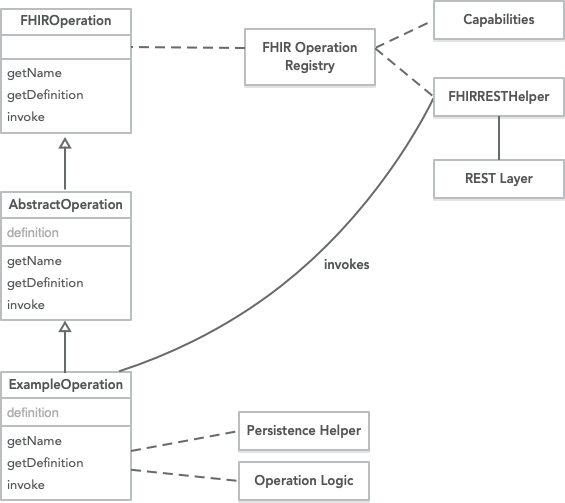
    The $member-match operation executes on the Resource Type – Patient/$member-match. The operation implements the IBM FHIR Server Extended Operation framework using the Java Service Loader.

    operation-framework

    The $member-match provides a default strategy to execute strategy executes a series of Searches on the local FHIR Server to find a Patient on the system with a Patient and Coverage (to-match). The strategy is extensible by extending the strategy.

    MemberMatch Framework

    If the default strategy is not used, the Java Service Loader must be used by the new strategy. To register a JAR, META-INF/services/com.ibm.fhir.operation.davinci.hrex.provider.strategy.MemberMatchStrategy the file must point to the package and class that implements MemberMatchStrategy. Alternatively, AbstractMemberMatch or DefaultMemberMatchStrategy may be used as a starting point.

    For implementers, there is an existing AbstractMemberMatch which provides a template and series of hooks to extend:

    MemberMatchResult implements a light-weight response which gets translated to Output Parameters or OperationOutcomes if there is no match or multiple matches.

    More advanced processing of the input and validation is shown in DefaultMemberMatchStrategy which processes the input resources to generate SearchParameter values to query the local IBM FHIR Server.

    It’s highly recommended to extend the default implementation and override the getMemberMatchIdentifier for the strategy:

    The $member-match operation is configured for each tenant using the respective fhir-server-config.json. The configuration is rooted under the path fhirServer/operations/membermatch.

    Name Default Description
    enabled true Enables or Disable the MemberMatch operation for the tenant
    strategy default The key used to identify the MemberMatchStrategy that is loaded using the Java Service Loader
    extendedProps true Used by custom MemberMatchStrategy implementations
    {
        "__comment": "",
        "fhirServer": {
            "operations": {
                "membermatch": {
                    "enabled": true,
                    "strategy": "default",
                    "extendedProps": {
                        "a": "b"
                    }
                }
            }
        }
    }
    

    Recipe

    1. Prior to 4.10.0, build the Maven Projects and the Docker Build. You should see [INFO] BUILD SUCCESS after each Maven build, and docker.io/ibmcom/ibm-fhir-server:latest when the Docker build is successful.
    mvn clean install -f fhir-examples -B -DskipTests -ntp
    mvn clean install -f fhir-parent -B -DskipTests -ntp
    docker build -t ibmcom/ibm-fhir-server:latest fhir-install
    
    1. Create a temporary directory for the dependencies that we’ll mount to userlib/, so it looks at:
    userlib\
        fhir-ig-us-core-4.10.0.jar
        fhir-ig-davinci-hrex-4.10.0.jar
        fhir-operation-member-match-4.10.0.jar
    
    export WORKSPACE=~/git/wffh/2021/fhir
    mkdir -p ${WORKSPACE}/tmp/userlib
    cp -p conformance/fhir-ig-davinci-hrex/target/fhir-ig-davinci-hrex-4.10.0-SNAPSHOT.jar ${WORKSPACE}/tmp/userlib/
    cp -p conformance/fhir-ig-us-core/target/fhir-ig-us-core-4.10.0-SNAPSHOT.jar ${WORKSPACE}/tmp/userlib/
    cp -p operation/fhir-operation-member-match/target/fhir-operation-member-match-4.10.0-SNAPSHOT.jar ${WORKSPACE}/tmp/userlib/
    

    Note, the use of snapshot as these are not yet released.

    1. Download the fhir-server-config.json.
    curl -L -o fhir-server-config.json \
        https://raw.githubusercontent.com/IBM/FHIR/main/fhir-server/liberty-config/config/default/fhir-server-config.json
      % Total    % Received % Xferd  Average Speed   Time    Time     Time  Current
                                     Dload  Upload   Total   Spent    Left  Speed
    100  8423  100  8423    0     0  40495      0 --:--:-- --:--:-- --:--:-- 40301
    
    1. Start the Docker container, and capture the container id. It’s going to take a few moments to start up as it lays down the test database.
    docker run -d -p 9443:9443 -e BOOTSTRAP_DB=true \
      -v $(pwd)/fhir-server-config.json:/config/config/default/fhir-server-config.json \
      -v ${WORKSPACE}/tmp/userlib:/config/userlib/ \
      ibmcom/ibm-fhir-server:latest
    4334334a3a6ad395c4b600e14c8563d7b8a652de1d3fdf14bc8aad9e6682cc02
    
    1. Check the logs until you see:
    docker logs 4334334a3a6ad395c4b600e14c8563d7b8a652de1d3fdf14bc8aad9e6682cc02
    ...
    [6/16/21, 15:31:34:533 UTC] 0000002a FeatureManage A   CWWKF0011I: The defaultServer server is ready to run a smarter planet. The defaultServer server started in 17.665 seconds.
    
    1. Download and update the Sample Data
    curl -L 'https://raw.githubusercontent.com/IBM/FHIR/main/conformance/fhir-ig-davinci-hrex/src/test/resources/JSON/020/Parameters-member-match-in.json' \
    -o Parameters-member-match-in.json
    
    1. Split the resource out from the sample:
    cat Parameters-member-match-in.json | jq -r '.parameter[0].resource' > Patient.json
    cat Parameters-member-match-in.json | jq -r '.parameter[1].resource' > Coverage.json
    
    1. Load the Sample Data bundle to the IBM FHIR Server
    curl -k --location --request PUT 'https://localhost:9443/fhir-server/api/v4/Patient/1' \
    --header 'Content-Type: application/fhir+json' \
    --header 'Prefer: return=representation' \
    --user "fhiruser:${DUMMY_PASSWORD}" \
    --data-binary  "@Patient.json"
    
    curl -k --location --request PUT 'https://localhost:9443/fhir-server/api/v4/Coverage/9876B1' \
    --header 'Content-Type: application/fhir+json' \
    --header 'Prefer: return=representation' \
    --user "fhiruser:${DUMMY_PASSWORD}" \
    --data-binary  "@Coverage.json"
    

    Note, DUMMY_PASSWORD should be previously set to your server’s password.

    1. Execute the Member Match
    curl -k --location --request POST 'https://localhost:9443/fhir-server/api/v4/Patient/$member-match' \
    --header 'Content-Type: application/fhir+json' \
    --header 'Prefer: return=representation' \
    --user "fhiruser:${DUMMY_PASSWORD}" \
    --data-binary  "@Parameters-member-match-in.json" -o response.json
    

    When you execute the operation, it runs two visitors across the Parameters input to generate searches against the persistence store:

    • DefaultMemberMatchStrategy.MemberMatchPatientSearchCompiler – Enables the Processing of a Patient Resource into a MultivaluedMap, which is subsequently used for the Search Operation. Note there are no SearchParameters for us-core-race, us-core-ethnicity, us-core-birthsex these elements in the US Core Patient profile. The following fields are combined in a Search for the Patient:

        - Patient.identifier
        - Patient.name
        - Patient.telecom
        - Patient.gender
        - Patient.birthDate
        - Patient.address
        - Patient.communication
      
    • DefaultMemberMatchStrategy.MemberMatchCovergeSearchCompiler Coverage is a bit unique here. It’s the CoverageToMatch – details of prior health plan coverage provided by the member, typically from their health plan coverage card and has dubious provenance. The following fields are combined in a Search for the Coverage.

        - Coverage.identifier
        - Coverage.beneficiary
        - Coverage.payor
        - Coverage.subscriber
        - Coverage.subscriberId
      

    Best wishes with MemberMatch.

  • Checking fillfactor for Postgres Tables

    My teammate implemented Adjust PostgreSQL fillfactor for tables involving updates #1834, which adjusts the amount of data in each storefile.

    Per Cybertec, fillfactor is important to "INSERT operations pack table pages only to the indicated percentage; the remaining space on each page is reserved for updating rows on that page. This gives UPDATE a chance to place the updated copy of a row on the same page as the original, which is more efficient than placing it on a different page." Link as such my teammate implemented in a PR a change to adjust the fillfactor to co-locate INSERT/UPDATES into the same space.

    Query

    If you want to check your fillfactor settings, you can can check the pg_class admin table to see your settings using the following scripts:

    SELECT 
    	pc.relname as "Table Name", 
    	pc.reloptions As "Settings on Table",
    	pc.relkind as "Table Type"
    FROM pg_class AS pc
    INNER JOIN pg_namespace AS pns 
    	ON pns.oid = pc.relnamespace
    WHERE pns.nspname = 'test1234'
    	AND pc.relkind = 'r';
    

    Note

    1. relkind represents the object type char r is a table. A good reference is the following snippet: relkind char r = ordinary table, i = index, S = sequence, v = view, m = materialized view, c = composite type, t = TOAST table, f = foreign table
    2. nspname is the schema you are checking for the fillfactor values.

    Results

    You see the value:

    basic_resources,{autovacuum_vacuum_scale_factor=0.01,autovacuum_vacuum_threshold=1000,autovacuum_vacuum_cost_limit=2000,fillfactor=90},'r'
    

    References

  • GitHub Action Workflow Tips

    I went through a Knowledge Transfer to a teammate who is implementing GitHub Actions and workflows in their repository. My team has been working with GitHub actions since they became available to developers. You can see my team’s workflows at https://github.com/IBM/FHIR/tree/main/.github/workflows and our automation scripts at https://github.com/IBM/FHIR/tree/main/build

    Here are my tips:

    Pushing Changes to GH Pages

    If you need to push changes back to GitHub, I recommend you checkout your code to a working sub folder and build in that subfolder, and copy the artifacts back to another subfolder and then push those changes (after a git add and commit with signature back to git)

    Triggering GH Pages Build

    In my build and release process, I generate my own website artifacts. I then need to call the API to trigger the GH Pages workflow as it is not automatically triggered by pushing the artifacts directly to the gh-pages branch. This trick starts the deployment of the branch to the gh-pages environment. It uses curl and the git hubs api.

    Grabbing the Current Tag

    I found this helpful to grab the tag and inject it into the Git Hub Environment variables in subsequent Workflow Job steps.

    Conditionally Skip based on a Label

    You should be able to skip your workflow at any given point, and you can add a conditional to skip, for instance ci-skip which should be a label in your repo.

    Capture your logs and Upload no matter what

    Workflows are designed to skip dependent steps on failure, Step B fails because Step A failed. It’s worth adding at the end of your workflow a step to gather any debug logs and pack them up, upload in all conditions.

    The condition is set with if: always().

    Lock your ‘uses’ workflow versions

    Lock in your workflow’s uses on a specific version. For instance, you can lock in on action/upload-artifact or action/checkout, and use the organization/repository to check the documentation on GitHub. Here are some key Actions and the links to their Repos.

    action/checkoutcheckout
    action/upload-artifactupload artifacts
  • Recipe: Running the IBM FHIR Server behind a Reverse Proxy

    A common deployment pattern for the IBM FHIR Server is to run the Application Server behind a reverse proxy (e.g. OpenShift Route, Kubernetes Ingress, NGINX or API Gateway). By default, the IBM FHIR Server runs under the https://localhost:9443/fhir-server/api/v4 context root and URI. With a modest configuration change, one can change to a context root (baseUrl) or use the X-FHIR-FORWARDED-URL to forward the incoming url to the IBM FHIR Server (expected to be from a trusted reverse proxy).

    In #1965, the fhirServer/core/externalBaseUrl is a tenant aware configuration that sets the context root and base URL. Note, the fhirServer/core/externalBaseUrl overrides the incomingUrl from X-FHIR-FORWARDED-URL.

    This document outlines how to set the externalBaseUrl for the IBM FHIR Server.

    Let me show you how to add a set the externalBaseUrl to an IBM FHIR Server container Docker: ibmcom/ibm-fhir-server. This feature requires 4.9.0 or higher.

    Recipe

    1. Prior to 4.9.0, build the Maven Projects and the Docker Build. You should see [INFO] BUILD SUCCESS after each Maven build, and docker.io/ibmcom/ibm-fhir-server:latest when the Docker build is successful.
    mvn clean install -f fhir-examples -B -DskipTests -ntp
    mvn clean install -f fhir-parent -B -DskipTests -ntp
    docker build -t ibmcom/ibm-fhir-server:latest fhir-install</code></pre>
    
    1. Download the fhir-server-config.json
    curl -L -o fhir-server-config.json \
        https://raw.githubusercontent.com/IBM/FHIR/main/fhir-server/liberty-config/config/default/fhir-server-config.json
      % Total    % Received % Xferd  Average Speed   Time    Time     Time  Current
                                     Dload  Upload   Total   Spent    Left  Speed
    100  8423  100  8423    0     0  35095      0 --:--:-- --:--:-- --:--:-- 34950
    
    1. Update the fhir-server-config.json at path fhirServer/core/externalBaseUrl to https://chocolate.fudge.
    "externalBaseUrl": "https://chocolate.fudge"
    
    1. Start the Docker container, and capture the container id. It’s going to take a few moments to start up as it lays down the test database.
    docker run -d -p 9443:9443 -e BOOTSTRAP_DB=true \
      -v $(pwd)/fhir-server-config.json:/config/config/default/fhir-server-config.json \
      ibmcom/ibm-fhir-server
    a096978867195ff6e610c36cdba77ff423c31c0ad488a7390f42cef6e89e7fd0
    
    1. Check the logs until you see:
    docker logs a096978867195ff6e610c36cdba77ff423c31c0ad488a7390f42cef6e89e7fd0
    ...
    [6/16/21, 15:31:34:533 UTC] 0000002a FeatureManage A   CWWKF0011I: The defaultServer server is ready to run a smarter planet. The defaultServer server started in 17.665 seconds.
    
    1. Download the Sample Data

    curl -L https://raw.githubusercontent.com/IBM/FHIR/main/fhir-server-test/src/test/resources/testdata/everything-operation/Antonia30_Acosta403.json -o Antonia30_Acosta403.json

    1. Load the Sample Data bundle to the IBM FHIR Server
    curl -k --location --request POST 'https://localhost:9443/fhir-server/api/v4' \
    --header 'Content-Type: application/fhir+json' \
    --user "fhiruser:${DUMMY_PASSWORD}" \
    --data-binary  "@Antonia30_Acosta403.json" -o response.json
    
    1. Scan the response.json for any status that is not "status": "201". For example, the status is in the family of User Request Error or Server Side Error.

    2. Check the patient and you’ll see the self and next relation links include https://chocolate.fudge

    curl -k --location --request GET 'https://localhost:9443/fhir-server/api/v4/Patient' \
    --header 'Content-Type: application/fhir+json' \
    --user "fhiruser:${DUMMY_PASSWORD}" \
    
    {
        "resourceType": "Bundle",
        "id": "37c5abc7-d3e7-4506-b596-9725c59f9b6b",
        "type": "searchset",
        "total": 23,
        "link": [
            {
                "relation": "self",
                "url": "https://chocolate.fudge/Patient?_count=10&_page=1"
            },
            {
                "relation": "next",
                "url": "https://chocolate.fudge/Patient?_count=10&_page=2"
            }
        ],
        "entry": [
            {
                "id": "17b123f9a79-bd2011c1-6606-4617-90ed-3187790955b8",
                "fullUrl": "https://chocolate.fudge/Patient/17b123f9a79-bd2011c1-6606-4617-90ed-3187790955b8",
                "resource": {
                    "resourceType": "Patient",
                    "id": "17b123f9a79-bd2011c1-6606-4617-90ed-3187790955b8",
                    "meta": {
                        "versionId": "1",
                        "lastUpdated": "2021-08-04T17:39:23.385314Z",
                        "tag": [
                            {
                                "system": "http://terminology.hl7.org/CodeSystem/v3-ActReason",
                                "code": "HTEST",
                                "display": "test health data"
                            }
                        ]
                    }
                }
            }
        ]
    }
    

    References

  • Postgres and Vacuum with the IBM FHIR Server: Debugging Details

    The IBM FHIR Server stores resources in the PostgreSQL database and uses a relational model to store historical FHIR Resource and enable search on the latest FHIR resources. The resource data is spread in a relational model that is occasionally tweaked in order to improve search or optimize the retrieval using the relational model.

    In the IBM FHIR Server Performance Guide, the guide outlines some important alterations to the tables that facilitate an optimized Postgres instance. The guide suggests altering, per your providers recommendation, autovacuum_vacuum_cost_limit, autovacuum_vacuum_scale_factor and autovacuum_vacuum_threshold in order to optimize the VACUUM process. With the IBM FHIR Server fhir-persistence-schema-cli, autovacuum_vacuum_scale_factor is not automatically configured, and not recommended on Databases for Postgres on IBM Cloud.

    As Postgres uses "multi-version concurrency control (MVCC) to ensure that data remains consistent and accessible in high-concurrency environments", each transaction runs on a snapshot, and needs to be reconciled so dead_rows are removed – vacuumed. The VACUUM process manages dead rows and disk usage (reuse). The VACUUM process (autovacuum) frequently runs – gathering statistics and reconciling the maintenance of the table statitstics and data.

    To check for tables that need vacuuming:

     SELECT relname AS "table_name",
            n_tup_ins AS "inserts",
            n_tup_upd AS "updates",
            n_tup_del AS "deletes",
            n_live_tup AS "live_tuples",
            n_dead_tup AS "dead_tuples"
       FROM pg_stat_user_tables
      WHERE schemaname = 'fhirdata'
        AND (relname = 'logical_resources' OR relname LIKE '%_values')
        AND n_dead_tup > 0;
    

    Then a database administrator runs – VACUUM FULL FHIRDATA.PROCEDURE_RESOURCE_TOKEN_REFS; to execute a vacuum, which runs in the background.

    While the VACUUM process is running, the pg_stat_progress_vacuum view can be queried to see worker process.

    SELECT * 
    FROM pg_stat_progress_vacuum;
    

    If you need to update a specific tables settings, you can run with --vacuum-table-name.

    java -jar ./fhir-persistence-schema-${VERSION}-cli.jar \
    --db-type postgresql --prop db.host=localhost --prop db.port=5432 \
    --prop db.database=fhirdb --schema-name fhirdata \
    --prop user=fhiradmin --prop password=passw0rd \
    --update-vacuum --vacuum-cost-limit 2000 --vacuum-threshold 1000 \
    --vacuum-scale-factor 0.01 --vacuum-table-name LOGICAL_RESOURCES
    

    To update all tables in a schema, you can run without the table parameter. If you omit any value, the defaults are picked as described in the Performance guide.

    If you hit a lock (ShareUpdateExclusiveLock), the VACUUM worker process is currently churning on the table, and the ALTER statement is waiting.

    • wait_type = Lock relation Waiting to acquire a lock on a relation.
    • wait_lock_type – ShareUpdateExclusiveLock Acquired by VACUUM and conflicts with ALTER

    CHeck for the Blocking PID, and grab the blocking_pid.

     -- list bad connections
       SELECT blocked_locks.pid     AS blocked_pid,
             blocked_activity.usename  AS blocked_user,
             blocking_locks.pid     AS blocking_pid,
             blocking_activity.usename AS blocking_user,
             blocked_activity.query    AS blocked_statement,
             blocking_activity.query   AS current_statement_in_blocking_process,
             blocked_activity.application_name AS blocked_application,
             blocking_activity.application_name AS blocking_application
       FROM  pg_catalog.pg_locks         blocked_locks
        JOIN pg_catalog.pg_stat_activity blocked_activity  ON blocked_activity.pid = blocked_locks.pid
        JOIN pg_catalog.pg_locks         blocking_locks 
            ON blocking_locks.locktype = blocked_locks.locktype
            AND blocking_locks.DATABASE IS NOT DISTINCT FROM blocked_locks.DATABASE
            AND blocking_locks.relation IS NOT DISTINCT FROM blocked_locks.relation
            AND blocking_locks.page IS NOT DISTINCT FROM blocked_locks.page
            AND blocking_locks.tuple IS NOT DISTINCT FROM blocked_locks.tuple
            AND blocking_locks.virtualxid IS NOT DISTINCT FROM blocked_locks.virtualxid
            AND blocking_locks.transactionid IS NOT DISTINCT FROM blocked_locks.transactionid
            AND blocking_locks.classid IS NOT DISTINCT FROM blocked_locks.classid
            AND blocking_locks.objid IS NOT DISTINCT FROM blocked_locks.objid
            AND blocking_locks.objsubid IS NOT DISTINCT FROM blocked_locks.objsubid
            AND blocking_locks.pid != blocked_locks.pid
        JOIN pg_catalog.pg_stat_activity blocking_activity ON blocking_activity.pid = blocking_locks.pid
       WHERE NOT blocked_locks.GRANTED and blocked_activity.usename = 'fhirserver'
    

    Try canceling the PID, SELECT pg_cancel_backend(205384);

    Else, cancel the current Transaction the blocked pid:

    -- cancel the blocking trannsaction/pid (hard stop)
    SELECT pg_cancel_backend(blocked_locks.pid)     AS blocked_pid,
             blocked_activity.usename  AS blocked_user,
             blocking_locks.pid     AS blocking_pid,
             blocking_activity.usename AS blocking_user,
             blocked_activity.query    AS blocked_statement,
             blocking_activity.query   AS current_statement_in_blocking_process,
             blocked_activity.application_name AS blocked_application,
             blocking_activity.application_name AS blocking_application
       FROM  pg_catalog.pg_locks         blocked_locks
        JOIN pg_catalog.pg_stat_activity blocked_activity  ON blocked_activity.pid = blocked_locks.pid
        JOIN pg_catalog.pg_locks         blocking_locks 
            ON blocking_locks.locktype = blocked_locks.locktype
            AND blocking_locks.DATABASE IS NOT DISTINCT FROM blocked_locks.DATABASE
            AND blocking_locks.relation IS NOT DISTINCT FROM blocked_locks.relation
            AND blocking_locks.page IS NOT DISTINCT FROM blocked_locks.page
            AND blocking_locks.tuple IS NOT DISTINCT FROM blocked_locks.tuple
            AND blocking_locks.virtualxid IS NOT DISTINCT FROM blocked_locks.virtualxid
            AND blocking_locks.transactionid IS NOT DISTINCT FROM blocked_locks.transactionid
            AND blocking_locks.classid IS NOT DISTINCT FROM blocked_locks.classid
            AND blocking_locks.objid IS NOT DISTINCT FROM blocked_locks.objid
            AND blocking_locks.objsubid IS NOT DISTINCT FROM blocked_locks.objsubid
            AND blocking_locks.pid != blocked_locks.pid
        JOIN pg_catalog.pg_stat_activity blocking_activity ON blocking_activity.pid = blocking_locks.pid
       WHERE NOT blocked_locks.GRANTED and blocked_activity.usename = 'fhirserver'
    

    Now, wait until the VACUUM finishes, and then execute a new ALTER.

    You should be all set at this point.

    Check wait_type

    -- Check Wait Type
    SELECT 
        waiting.locktype           AS waiting_locktype,
        waiting.relation::regclass AS waiting_table,
        waiting_stm.query          AS waiting_query,
        waiting.mode               AS waiting_mode,
        waiting.pid                AS waiting_pid,
        other.locktype             AS other_locktype,
        other.relation::regclass   AS other_table,
        other_stm.query            AS other_query,
        other.mode                 AS other_mode,
        other.pid                  AS other_pid,
        other.granted              AS other_granted
    FROM
        pg_catalog.pg_locks AS waiting
    JOIN
        pg_catalog.pg_stat_activity AS waiting_stm
        ON (
            waiting_stm.pid = waiting.pid
        )
    JOIN
        pg_catalog.pg_locks AS other
        ON (
            (
                waiting."database" = other."database"
            AND waiting.relation  = other.relation
            )
            OR waiting.transactionid = other.transactionid
        )
    JOIN
        pg_catalog.pg_stat_activity AS other_stm
        ON (
            other_stm.pid = other.pid
        )
    WHERE
        NOT waiting.granted
    AND
        waiting.pid <> other.pid   
    
    SELECT
      schemaname, relname,
      last_vacuum, last_autovacuum,
      vacuum_count, autovacuum_count, *
    FROM pg_stat_user_tables
    WHERE schemaname = 'fhirdata' AND relname = 'observation_date_values';
    

    Check with locks

    SELECT now()::time, query, backend_start, xact_start, query_start,
             state_change, state,
             now()::time - state_change::time AS locked_since,
             pid, wait_event_type, wait_event
      FROM pg_stat_activity
      WHERE wait_event_type IS NOT NULL and wait_event_type = 'Lock'
    ORDER BY locked_since DESC;
    

    Check a PID

    SELECT a.usename, a.application_name, a.datname, a.query,
             l.granted, l.mode, transactionid
        FROM pg_locks l
        JOIN pg_stat_activity a ON a.pid = l.pid
        WHERE granted = false AND a.pid = 327589;
    

    Check a tansaction

    SELECT a.usename, a.application_name, a.datname, a.query,
            l.granted, l.mode, transactionid,
            now()::time - a.state_change::time AS acquired_since,
            a.pid
       FROM pg_locks l
       JOIN pg_stat_activity a ON a.pid = l.pid
       WHERE granted = true AND transactionid = 3031;
    

    Reference

  • Syncing Git Tags across Repositories

    To sync the tags from one repository to another, you can do the following:

    1. Clone the repository that you want the tags to be in, and change to that cloned repository.
    git clone git@github.com:prb112/FHIR.git
    cd FHIR
    
    1. Add a remote to the original repository.
    git remote add fhiro git@github.com:IBM/FHIR.git
    
    1. Check that the remote is there (fhiro).
    git remote -v
    fhiro	git@github.com:IBM/FHIR.git (fetch)
    fhiro	git@github.com:IBM/FHIR.git (push)
    origin	git@github.com:prb112/FHIR.git (fetch)
    origin	git@github.com:prb112/FHIR.git (push)
    
    1. Fetch the original tags.
    git fetch fhiro --prune --tags
    
    1. Check the tags are shown.
    git tag --list
    
    1. Remove the remote.
    git remote remove fhiro
    
    1. Check that the remote is removed.
    git remote -v
    origin	git@github.com:prb112/FHIR.git (fetch)
    origin	git@github.com:prb112/FHIR.git (push)
    
    1. Push the tags to the new destination.
    git push --tags
    

    Note I did disable the GitHub Actions prior, and re-enabled after.

    References

  • Determining Function Signatures with Postgres

    I had duplicate Postgres base signatures, and I needed to diagnose the reasons why it was failing to update. The following are helpful for diagnosing functions:

    References

    StackOverflow DROP FUNCTION without knowing the number/type of parameters?

    StackOverflow: pg_proc

  • GPG complains about No keyserver available

    When I wanted to deploy my key to openpgp, I hit the issue where it said No keyserver available:

    $ gpg  --verbose --keyserver hkps://keys.openpgp.org  --send-keys KEYDYID
    gpg: Note: RFC4880bis features are enabled.
    gpg: sending key KEYDYID to hkps://keys.openpgp.org
    gpg: keyserver send failed: No keyserver available
    gpg: keyserver send failed: No keyserver available
    

    If you hit this, you can ps -ef dirmgr and then kill -9 the pid for the dirmngr.

    Restart the dirmngr --debug-all --daemon --standard-resolver

    Check the output for any errors (in my case a TLS issue – TLS connection authentication failed: General error)

    09:02:27-homedir@machine:~$ dirmngr --debug-all --daemon --standard-resolver
    dirmngr[58503]: reading options from '/Users/homedir/.gnupg/dirmngr.conf'
    dirmngr[58503]: reading options from '[cmdline]'
    dirmngr[58503]: enabled debug flags: x509 crypto memory cache memstat hashing ipc dns network lookup extprog
    dirmngr[58503]: listening on socket '/Users/homedir/.gnupg/S.dirmngr'
    DIRMNGR_INFO=/Users/homedir/.gnupg/S.dirmngr:58504:1; export DIRMNGR_INFO;
    09:02:52-homedir@machine:~$ dirmngr[58504.0]: permanently loaded certificates: 133
    dirmngr[58504.0]:     runtime cached certificates: 0
    dirmngr[58504.0]:            trusted certificates: 133 (132,0,0,1)
    dirmngr[58504.4]: handler for fd 4 started
    dirmngr[58504.4]: DBG: chan_4 -> # Home: /Users/homedir/.gnupg
    dirmngr[58504.4]: DBG: chan_4 -> # Config: /Users/homedir/.gnupg/dirmngr.conf
    dirmngr[58504.4]: DBG: chan_4 -> OK Dirmngr 2.3.1 at your service
    dirmngr[58504.4]: DBG: END Certificate
    dirmngr[58504.4]: DBG: BEGIN Certificate 'server[2]':
    dirmngr[58504.4]: DBG:      serial: 4001772137D4E942B8EE76AA3C640AB7
    dirmngr[58504.4]: DBG:   notBefore: 2021-01-20 19:14:03
    dirmngr[58504.4]: DBG:    notAfter: 2024-09-30 18:14:03
    dirmngr[58504.4]: DBG:      issuer: CN=DST Root CA X3,O=Digital Signature Trust Co.
    dirmngr[58504.4]: DBG:     subject: CN=ISRG Root X1,O=Internet Security Research Group,C=US
    dirmngr[58504.4]: DBG:   hash algo: 1.2.840.113549.1.1.11
    dirmngr[58504.4]: DBG:   SHA1 fingerprint: 933C6DDEE95C9C41A40F9F50493D82BE03AD87BF
    dirmngr[58504.4]: DBG: END Certificate
    dirmngr[58504.4]: TLS connection authentication failed: General error
    dirmngr[58504.4]: error connecting to 'http://keys.openpgp.org:80': General error
    dirmngr[58504.4]: command 'KS_PUT' failed: General error <Unspecified source>
    dirmngr[58504.4]: DBG: chan_4 -> ERR 1 General error <Unspecified source>
    dirmngr[58504.4]: DBG: chan_4 <- BYE
    dirmngr[58504.4]: DBG: chan_4 -> OK closing connection
    dirmngr[58504.4]: handler for fd 4 terminated
    

    Create the file ~/.gnupg/dirmngr.conf with the following contents

    keyserver hkps://keys.openpgp.org
    hkp-cacert /Users/homedir/.gnupg/my.pem 
    

    Download the openpgp ceritifcate

    echo "" | openssl s_client -showcerts -prexit -connect keys.openpgp.org:443 2> /dev/null \
        | sed -n -e '/BEGIN CERTIFICATE/,/END CERTIFICATE/ p' > ~/.gnupg/my.pem 
    

    Restart the dirmngr

    Re-execute the gpg command

    09:02:58-paulbastide@pauls-mbp:~$ gpg --keyserver hkp://keys.openpgp.org:80 --send-keys KEYDYID
    gpg: sending key KEYDYID to hkp://keys.openpgp.org:80
    

    Thanks to https://gist.github.com/troyfontaine/18c9146295168ee9ca2b30c00bd1b41e for the assist.

  • GitHub Actions: Paging file is too small

    If you hit this issue, per the GitHub community it’s a Windows issue that can be worked around with a Pagefile. link

    [ERROR] OpenJDK 64-Bit Server VM warning: INFO: os::commit_memory(0x0000000700000000, 553648128, 0) failed; error='The paging file is too small for this operation to complete' (DOS error/errno=1455)

    I used the discussed GitHub Action configure-pagefile

    You can see the solution inline at GitHub Actions Workflow

        - name: Configure Pagefile
          uses: al-cheb/configure-pagefile-action@v1.2
          with:
            minimum-size: 8GB
            maximum-size: 8GB
            disk-root: "C:"
    
  • htop and docker

    I was recently introduced to htop – it generates a really nice UI to. see what’s going on.

      • Install htop
    yum install htop -y
    ...
    Transaction test succeeded
    Running transaction
      Installing : htop-2.2.0-3.el7.x86_64                                                                                          1/1
      Verifying  : htop-2.2.0-3.el7.x86_64                                                                                         1/1
    Installed:
      htop.x86_64 0:2.2.0-3.el7
    Complete!
    

    2 – Type htop, and start diagnosing (iostats also helps)